PAGE ATLAS / REVIEW GUIDE
How to Review Client Website Revisions Against Your Design Brief
Bring the screenshot, the revision and the reasoning behind your design into the same conversation.
Watch the review workflow.
Open or download the MP4 video ↗
Read the video transcript
- Make feedback specific. Keep the design intent in view.
- In Page Atlas, record the concept and meeting decisions before the review.
- Open a captured page. Mark the area and describe exactly what needs to change.
- Create a client review link to bring the screenshot and request into one review.
- The recorded AI result flags a request to change an agreed green button to red. Its source excerpt is
Do not use red backgrounds.
People decide how to resolve the conflict. - Illustrative example: an optional phone number becomes required. Has the design priority changed? This fictional scenario is not a recorded AI outcome.
- Explore Page Atlas and the free demo at pageatlas.site/lp/en/. JPY 2,200/month, tax included. 30-day trial with email and password, no card and no automatic charge. A separate free 24-hour demo is also available.
A small revision can change an important decision.
Imagine you’re designing a consultation form. During planning, you and your client agree to keep the phone number optional. Some visitors may worry that leaving their number will lead to sales calls, so the form should let them make an inquiry without that concern.
Later, a revision arrives: Please make the phone number required.
It’s a straightforward request. But it changes a decision you made for a reason.
This consultation-form scenario is a fictional example.
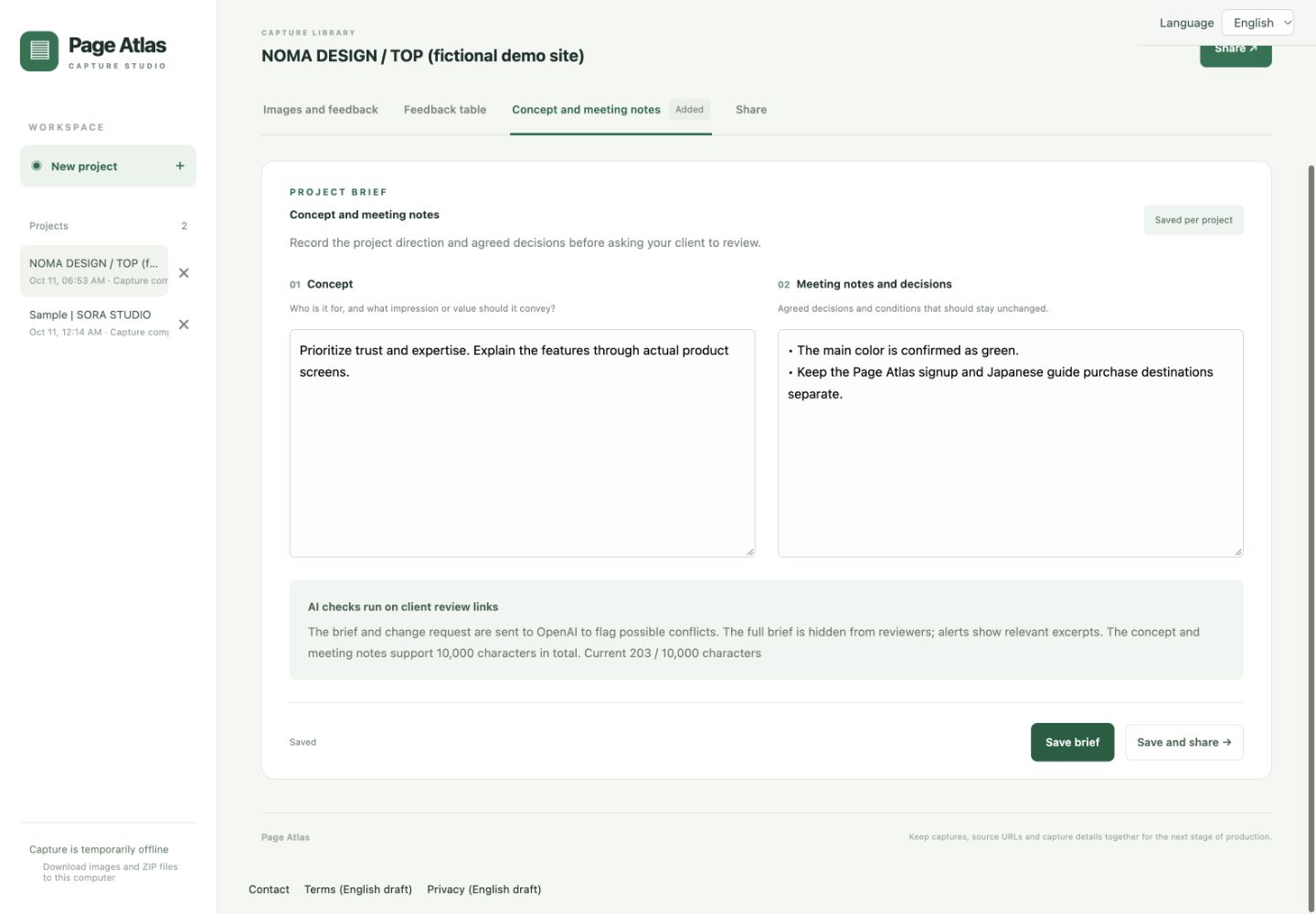
01 / PROJECT BRIEF
Record the reasoning behind the design.
Add the project concept and relevant meeting notes in Concept and meeting notes. Record the decision and the reason behind it, rather than only the preferred appearance.
Keep the phone number optional. Visitors who worry about sales calls should be able to submit a consultation request without providing one.
02 / PAGE CAPTURES
Capture the pages you’re reviewing.
Start with the website’s homepage URL. PageAtlas captures multiple pages as full-page screenshots, giving the review a visual reference. Open the capture containing the consultation form.
03 / LOCATION-BASED FEEDBACK
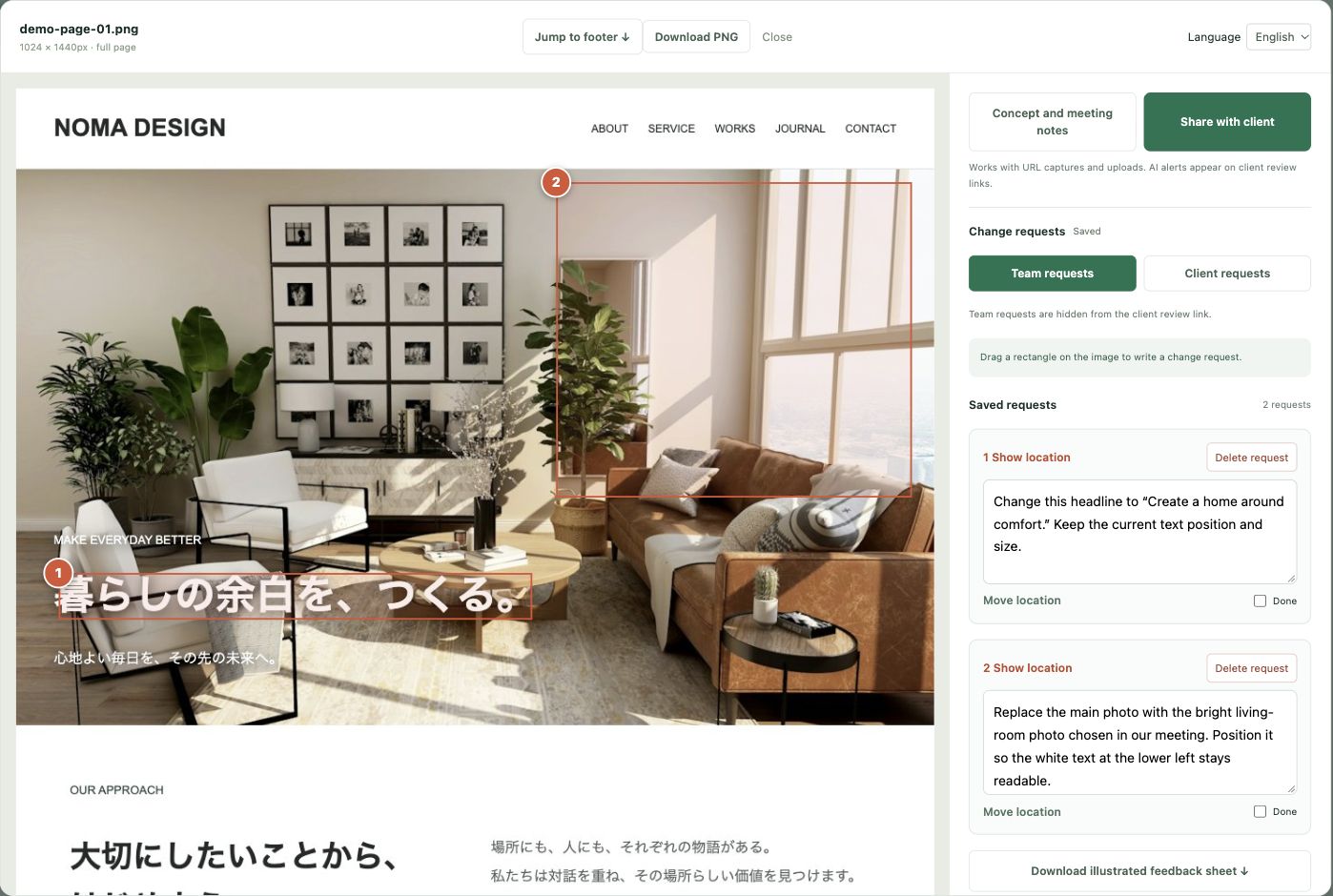
Put the feedback where the change belongs.
Save your brief, open Share and create a client review link. On that review screen, open an image and drag over the relevant area to attach a change request. Make the phone number required
belongs beside the phone field.
04 / AI COMPARISON
Compare the request with the agreed direction.
Use PageAtlas’s AI comparison on the client review screen to review the request against the project concept and meeting notes. Here, the question is whether requiring a phone number conflicts with the earlier decision to accommodate visitors concerned about sales calls.
AI output supports review; you and your client make the decision. If a conflict alert prevents saving, discuss the decision and revise the request or the recorded agreement as appropriate, then check again. The request cannot be saved until the conflict alert is resolved.
05 / CLIENT CONVERSATION
Bring a focused question back to your client.
We kept the phone number optional because some visitors may worry about sales calls. Making it required would change that decision. Has the priority changed, or should we keep it optional?
A client review request you can adapt.
Replace the bracketed details before sending. Check the project and review link using your usual sharing process.
Hi [Name],
Could you review [page or milestone] using this PageAtlas link?
[Review link]Open the relevant image, drag a rectangle over the area that needs a change, and describe what should change and why. Please use one request per change.
Review the AI check, then choose Save when it is available to share the request with our team. A request with a conflict alert cannot be saved until the alert is resolved.
If a request changes the concept or a decision from our meeting notes, please discuss that point with us so we can agree on the next step.
Please send feedback by [date and time]. If there are no changes, please let us know separately.
Thanks,
[Your name / team]
A short checklist for your first review.
- Agree on the focus. Tell your client which page or milestone you want to review and which decisions the round should cover.
- Prepare the reference. Save the relevant decisions in Concept and meeting notes, then capture or upload the images you need.
- Create the review link. Open Share and choose Create client review link. Check the project and link before forwarding it through your usual channel.
- Collect specific requests. Ask the reviewer to open an image, mark the area and choose Add request. They can use Check alignment, review the result and choose Save when available. A conflict alert must be resolved before the request can be saved.
- Review the feedback together. Use the Feedback table to review saved requests. Discuss changes to priorities and confirm decisions or approval through your usual communication process.
- Keep the agreement current. Update the brief only when you have agreed on a changed decision. Revise the relevant request as needed and check it again.
The review request and checklist describe a suggested process. Confirm access and sharing arrangements for your own project before sending a link.
Try the workflow with your next review.
PageAtlas brings page captures, location-based feedback and the reasoning behind your design into the same review process.
Start your own projects with a 30-day trial. After the trial, existing records remain available to view and download. To resume editing, choose JPY 2,200/month in Billing and complete payment. Your account and projects stay the same. Payment starts a monthly subscription immediately, including if you choose to switch during the trial.
JPY 2,200/month, tax included. 30-day trial with email and password, no card and no automatic charge. A separate free 24-hour demo is also available.
No email or card required. The demo includes up to 3 captures or uploads, 30 pages per capture and 10 AI checks, subject to shared daily limits.
Explore PageAtlas and the free demo →